
How to Connect Cal.com to RingBot
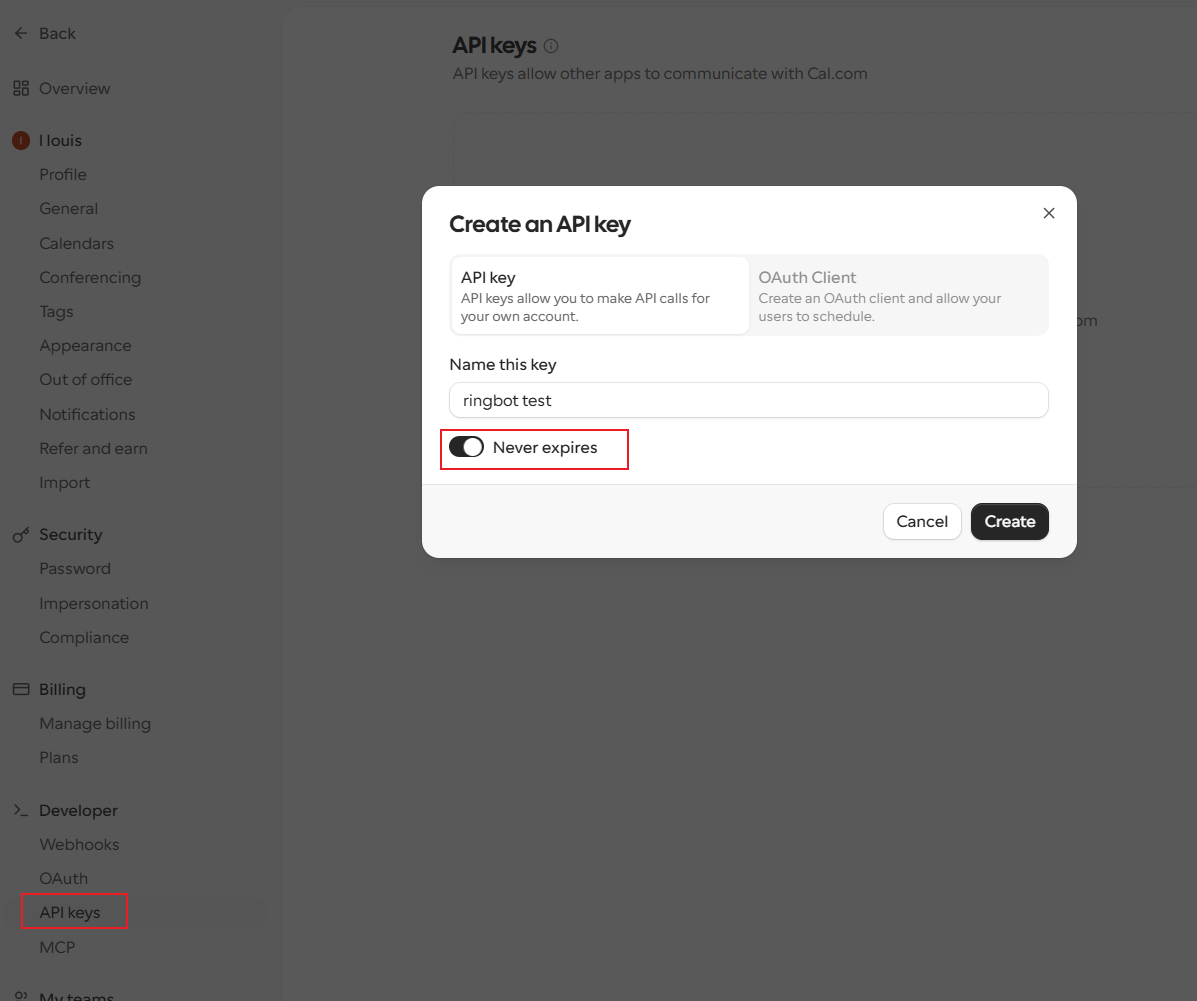
Summary: Connect Cal.com as the booking calendar for a RingBot AI agent in 7 steps: (1) Sign up for a Cal.com account at https://cal.com/, (2) Create a Cal.com API key under Developer > API keys (enable Never expires so the connection stays active), (3) Open Agent Design in RingBot, select your agent, and choose Cal.com under Integrations > Booking calendar, (4) Paste the Cal.com API key for the account or team that owns the event type, (5) Choose the event type RingBot should book, (6) Click Use for this agent, and (7) Click Save to apply the configuration.
00 / Booking Calendar Integration
How to Connect Cal.com to RingBot
Let your RingBot AI agent check real-time availability and book appointments directly into your Cal.com calendar during live phone calls and chats.
01 / Account Setup
Create a Cal.com Account
If you do not already have a Cal.com account, sign up at https://cal.com/ and make sure you have at least one Event Type configured for the appointments you want RingBot to book.
02 / Credentials
Create an API Key in Cal.com
03 / Agent Configuration
Select Cal.com in RingBot Agent Design
In your RingBot dashboard, open Agent Design and select the agent you want to connect. Navigate to the Integrations tab, locate the Booking calendar section, and select Cal.com.
04 / Finalize Connection
Authorize, Choose Event Type, and Save
Paste a Cal.com API key for the account or team that owns the event type.
Select the Cal.com event type that RingBot should use when booking appointments for callers.
Click Use for this agent to bind the Cal.com connection and selected event type to your agent draft.
Click Save to persist your agent configuration and make Cal.com booking live.
No Event Types Appearing?
The Cal.com API key must belong to the account or team that owns the event type and have permission to read event types and create bookings. If no event types appear after pasting your key, generate a new key from the owning Cal.com account or team and reconnect.
Next Step
Ready to configure your agent?
Explore the Getting Started guide or jump straight into Agent Design.